Ultimate Guide to Personalized Storybook Creation
Personalized storybooks let kids become the stars of their own adventures by incorporating names, photos, and personal details into the story. These books, often 30 pages long and available in digital or printed formats, use advanced AI tools to create lifelike illustrations. Platforms like Leo Books make the process quick and simple - upload photos, choose a theme, and preview the final product.
Key Highlights:
- Why it Matters: Kids engage more with stories when they see themselves as the hero, turning reading into a fun, interactive experience.
- How It Works: AI tools generate illustrations based on uploaded photos, while customization options include themes, story tone, and dedications.
- Cost: Digital versions start at $8.99; printed options range from $35.99 to $44.99.
- Formats: Choose from softcover, hardcover, or digital versions, with styles like watercolors or bold cartoons.
- Ease of Use: Platforms streamline the process, offering instant previews, editing tools, and accessibility features.
Whether for a birthday, family memory, or everyday fun, these storybooks turn moments into keepsakes.
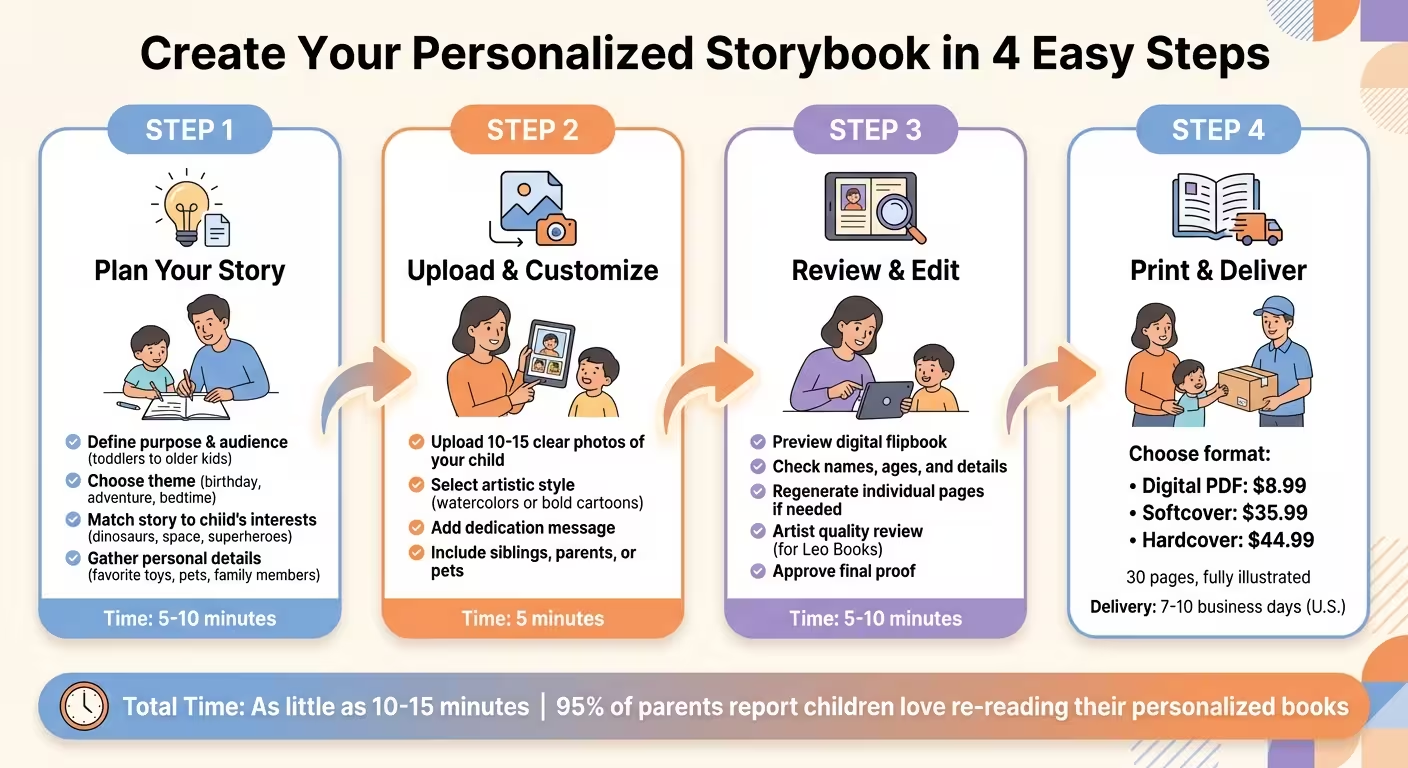
Planning Your Custom Storybook
Define Your Storybook’s Purpose
Start by identifying the purpose of your storybook and the audience you’re creating it for. The format can vary depending on age: toddlers often enjoy board books with bold visuals, preschoolers gravitate toward picture books with minimal text, early chapter books suit ages 6–8, and older kids will appreciate longer, more detailed stories.
Match the tone of the story to the occasion. A birthday or holiday theme might call for something celebratory, while milestone events could inspire a heartfelt narrative. Adventure stories should bring excitement and energy, while bedtime tales need to have a calming, soothing tone. If your child loves dinosaurs, space, or superheroes, incorporate those interests into the story. When the theme reflects their passions, it becomes a book they’ll want to revisit again and again.
Once the purpose is clear, gather the elements that will make your story truly personal.
Gather Personal Details for Customization
The charm of a personalized storybook lies in the little details that mirror your child’s world. Include favorite toys, beloved pets, family members, or even challenges they’re facing. For photo-realistic AI-generated books, like those from Leo Books, you’ll need 10–15 expressive photos to create illustrations that capture your child’s personality.
If your child is old enough, involve them in picking the artistic style. Whether they prefer soft, dreamy watercolors or bold, colorful cartoons, their input makes the final product feel even more special [1][5]. Don’t forget to include a meaningful dedication on the first page. A heartfelt message transforms the book into a cherished keepsake [1][5][3]. Fun fact: 95% of parents report that their children love re-reading their personalized books, so these thoughtful touches make a big difference.
With these personal details in hand, you can choose a format that aligns with your vision and budget.
Set Goals for Format and Budget
Choosing the right format depends on your child’s age and how much you’re willing to spend. Digital editions are a budget-friendly option, starting at around $8.99, and can be ready in just 10 to 20 minutes [1]. Printed versions, on the other hand, offer lasting keepsakes. Softcover options start at $35.99 and are great for everyday use, while hardcovers - priced at $44.99 - are perfect for milestone gifts that you want to preserve for years [1][3].
Popular U.S. trim sizes include an 8.5 x 8.5 inch square format, an 11 x 8.5 inch landscape, and the classic 8.5 x 11 inch option [7]. Most premium personalized storybooks feature 20 to 30 fully illustrated pages [1]. You can also consider extras like audiobooks. For those on a tighter budget, DIY AI tools cost $10–$30 per month, with an additional $20–$30 for print-on-demand services. While this approach requires more effort, it’s a cost-effective alternative to full-service platforms like Leo Books.
With your format and budget set, you’re ready to dive into the tools that will bring your storybook to life.
Using Creation Tools
Overview of Creation Interfaces
Most modern platforms simplify the book creation process into three or four straightforward steps: pick a theme, upload photos or enter details, customize the design, and preview before purchasing.
A standout feature to look for is the ability to fine-tune individual pages without redoing the entire project. For instance, if an AI-generated illustration doesn’t quite hit the mark, quality tools let you regenerate that specific page while keeping everything else intact. Take Leo Books as an example - they include an artist review step where human editors check every illustration before it goes to print. Platforms are also adding multi-character support, allowing you to include siblings, parents, or even pets in the story, making it feel even more personal.
Another exciting development is the move from generic cartoon avatars to photo-realistic AI illustrations. Instead of selecting traits like hair color or eye shape from a preset menu, you can upload 10–15 clear photos, and the AI creates artwork that truly reflects your child’s unique features and personality. This evolution in design tools makes the transition from concept to creation smoother than ever.
Step-by-Step Workflow for Customization
Start by choosing a theme - whether it’s a space adventure, a bedtime story, or something else entirely. Some platforms even let AI suggest themes based on your preferences. After that, enter your child’s details and upload 10–15 photos that clearly capture their expressions and features. These photos are used to generate personalized illustrations that stay consistent throughout the book.
You can also add a heartfelt dedication to make the book a keepsake that’s cherished for years. Before finalizing your order, you’ll get to preview a digital flipbook version, giving you the chance to review and tweak pages until everything feels just right. This step-by-step process makes customization intuitive and stress-free.
Accessibility and Usability Features
The best creation tools prioritize ease of use, especially for parents who might not be tech-savvy. Features like autosave ensure that your progress is never lost, while cloud syncing allows you to start designing on your laptop and pick up right where you left off on your smartphone.
For added convenience, speech-to-text functionality lets you dictate story ideas instead of typing them out. Screen reader compatibility, using tools like VoiceOver or JAWS, ensures visually impaired users can navigate the platform with ease. Many platforms also offer speech-to-text support in over 120 languages, making it possible for non-native English speakers to join in the creative process.
With guided workflows, instant previews, and mobile-friendly designs featuring touch controls and built-in dictation, you can create a polished, professional-looking book in as little as 10–15 minutes - even if it’s your first time designing one. These tools are designed to make the process accessible and enjoyable for everyone.
Designing Your Story and Illustrations
Writing and Personalizing the Story
Shape your story around what excites your child. Whether they love dinosaurs, rockets, or space adventures, let their interests guide the narrative. You can even draw inspiration from real-life experiences, like a family trip to Yellowstone, Disney World, or a day at the beach[1]. These personal touches make the story feel closer to home.
Using AI tools like ChatGPT[8] can simplify the creative process. Tailor the tone and complexity to your child’s age. For instance, younger children (ages 4–6) might enjoy shorter stories of up to 1,000 words, while kids aged 5–9 can handle narratives closer to 2,500 words[9]. As Saquib Alam, an expert in Robotics and Generative AI, explains:
“A good story can spark curiosity in science, inspire a love for music, or even help kids process emotions. But when a story is about them… the connection is magical”[8].
Incorporate personal items that hold special meaning for your child. A favorite toy, blanket, or even a beloved teddy bear like “Buttons” or toy robots named “Beep and Boop” can be woven into the story’s plot[1]. For example, Sarah T. from Seattle, WA, used Leo Books to feature her twins’ stuffed dinosaurs, T-Rex and Spike, as characters in a space-themed bedtime story[1]. These details turn a simple story into something deeply personal and memorable.
Once your narrative is ready, it’s time to focus on the visual elements that bring the story to life.
Customizing Characters and Artwork
Bring your child into the story by uploading their photos to create AI illustrations that resemble them[1][4]. Choose an artistic style that fits the tone of your book, whether it’s soft watercolors or bold, vibrant 3D designs[1].
You can also define your characters’ personality traits and add unique details, like a favorite cape or a musical instrument, to make them feel more alive[10]. If you’re including pets or siblings, ensure their features - such as fur color, clothing, or facial expressions - stay consistent throughout the book.
If an illustration doesn’t match your vision, the regenerate tool lets you adjust specific pages without affecting the rest of the book[1]. Leo Books also offers an artist review step where human editors check illustrations for quality and consistency before printing[1]. This ensures the final product is polished and exactly how you imagined it.
Once your characters and illustrations are just right, move on to the final review process.
Editing and Reviewing for Final Touches
Use a digital flipbook to preview your story and check for errors. Pay close attention to the spelling of names, ages, and dedication messages to ensure everything is accurate[3][11].
Double-check that character traits like hair color, clothing, and facial features remain consistent across all pages[1]. Also, make sure the text and illustrations work together seamlessly on every page. For younger readers, keep it simple with 1–2 sentences per page, while older kids might enjoy more detailed text with richer vocabulary.
If you notice any misaligned elements, use the regenerate tool to make adjustments until everything looks perfect. Once you’re satisfied with the story and visuals, you’re ready to move on to printing and delivery.

Finalizing and Preserving Your Storybook
Review and Finalize Your Project
Before placing your order, take a close look at the instant preview of your digital storybook. This is your chance to double-check everything - names, ages, and dedication messages. Pay special attention to the details, like character features (hair color, clothing, facial expressions), ensuring they stay consistent throughout the book. Once you’re happy with how it looks, approve the final digital proof.
Leo Books takes quality seriously. As they explain:
“Every book is reviewed by our in-house artists before it goes to print. This ensures that all illustrations meet our quality standards and your child’s story looks perfect.” [1]
When uploading files, make sure they’re in CMYK format at 300 dpi with a 1/8” bleed to avoid any white edges after printing. Once you’ve approved the digital proof, the printing process begins.
Printing and Delivery Considerations
Leo Books gives you two options for your personalized storybook: softcover and hardcover. The hardcover is sturdy and makes a great gift, perfect for preserving memories over time. The softcover is lighter and ideal for everyday use.
Pricing for a 30-page book starts at $35.99 for the softcover version and $44.99 for the hardcover. If you’d prefer a digital-only version, you can grab a PDF for $8.99. Reprints are available at slightly higher rates - approximately $36.00 for softcover and $46.00 for hardcover.
For U.S. customers, books are typically printed and shipped within 7 to 10 business days. Each order goes through one last manual quality check to ensure everything looks just right before heading out.
Caring for Your Storybook Keepsake
Once your storybook arrives, treat it with care to keep it looking its best. Consider storing it in a keepsake box or wrapping it in acid-free fabric to protect it from dust and damage. If little hands will be flipping through the pages often, think about extra protection like laminating the pages or opting for heavy-weight cardstock to reduce wear and tear.
It’s also a good idea to maintain a digital backup - either as a high-resolution PDF or image files - so you have a copy of your story in case anything happens to the physical book.
How To Create Your Own Story Book For Kids With Canva And ChatGPT

Conclusion
Thanks to modern platforms, creating a personalized storybook has never been easier - it can take as little as 5 minutes to bring your story to life, combining advanced technology with sleek, user-friendly design [1].
When children see themselves as the hero of their own story, it sparks engagement and fosters a deep emotional connection. Parents often share how meaningful these keepsakes are, describing the joy and satisfaction they bring to their families. Personalized storybooks aren’t just fun - they’re cherished reminders that every child’s life is filled with stories worth celebrating.
Leo Books takes this experience to the next level by enhancing every part of the process. With features like instant previews, the ability to tweak individual pages until they’re just right, and quality checks by in-house artists, you can feel confident in the final product before it even goes to print [1]. Plus, their “no payment until you approve” policy ensures peace of mind at every step [1]. Starting at $35.99 for a 30-page book, it’s an investment in a keepsake that will be treasured for years to come.
Whether you’re marking a special occasion like a birthday or capturing everyday family moments, a personalized storybook turns those memories into lasting adventures. The tools are ready, the process is simple, and the memories you create will be truly unforgettable.
FAQs
How can I make sure the illustrations reflect my child’s unique personality?
To create illustrations that truly reflect your child’s personality, start by uploading clear, high-quality photos that highlight their unique facial features and expressions. Then, pick an artistic style that complements their vibe - whether that’s something soft and dreamy or bold and full of energy. Choose a story theme that resonates with their interests, like exploring outer space, embarking on a jungle adventure, or reigning over a magical kingdom, to make the story feel uniquely theirs.
Once you’ve set everything up, review the digital preview carefully. Check details like their facial features, expressions, and clothing to ensure they match perfectly. Make any necessary tweaks before giving your final approval. This way, the finished hardcover book will be a beautiful, personal keepsake that celebrates your child’s individuality.
Why should I choose a printed storybook instead of a digital version?
Printed storybooks deliver a tangible, screen-free way to enjoy stories, boosting understanding, memory, and emotional engagement. They create a unique opportunity for connection during storytime, away from the interruptions of digital devices.
Beyond that, a well-made printed book becomes a treasured keepsake, something to hold onto and revisit over the years - a meaningful addition to any family’s collection. Leo Books offers beautifully illustrated, hardcover personalized storybooks crafted to help you create these lasting moments.
How does the AI create different art styles for the storybook?
The AI design tool lets you customize the artistic style of your storybook before the illustrations are generated. After uploading photos of your child or their favorite pet, you can pick from options like gentle watercolors or vibrant, cartoon-like designs. The AI then converts the images into illustrations that align with your selected style, creating a consistent look throughout the book.
This approach ensures the finished hardcover captures the mood you’re aiming for - whether it’s a calming bedtime tale or a thrilling adventure - all without requiring a human illustrator to manually create each page.